

MobileCollect Selection Tool
Free Download of MobileCollect Selection Tool
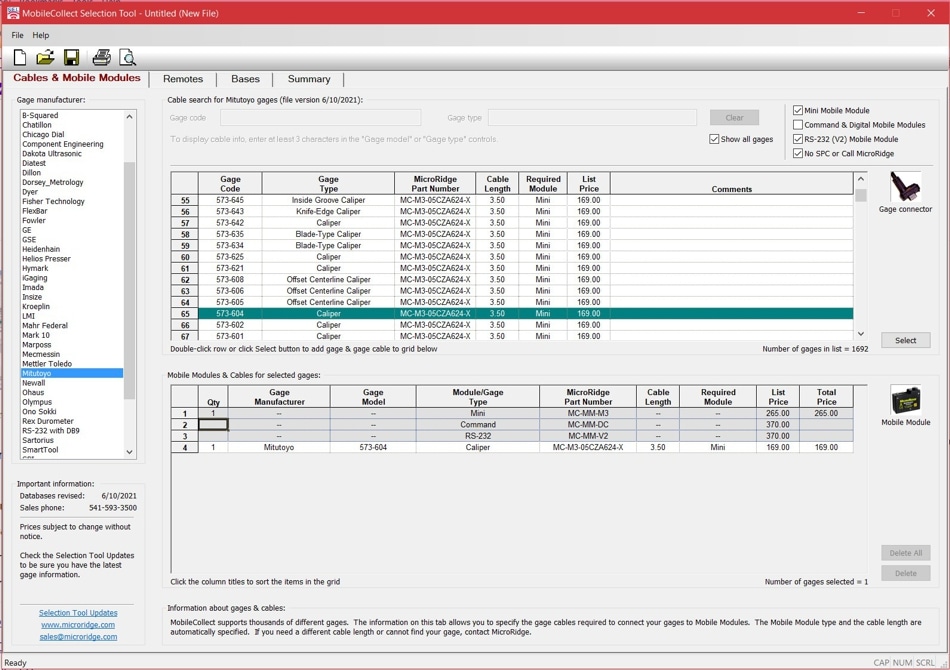
How to determine the correct Mobile Module transmitter and cable combination for each gage connecting to a MobileCollect wireless system. With the MobileCollect Selection Tool, you can easily configure a MobileCollect system with a few clicks of the mouse.All you need is the gage brand, model/code information, and the number of data collection computers you have.The MobileCollect Selection Tool program is free to download and is updated annually.
Download MobileCollect Selection Tool
Update released: November 14, 2023
Includes User’s Guide
View the short training video here
Why do you need MobileCollect Selection Tool?
The MobileCollect Selection Tool program provides valuable information on all gages researched for compatibility with our Mobile Module transmitters.
It allows the user to quickly identify the proper transmitter and cable combination for each gage device, and can be used to create a MobileCollect Wireless system report that can be printed, saved, or emailed that shows the following:
- Transmitter cable and quantity for each gage.
- Mobile Module transmitter models and quantity.
- Base receiver models and quantity.
- Remote transmitter models and quantities.
- Total system cost.